How to Plan a College Semester That Can Survive Changes
Create a realistic semester map from official course information and fixed commitments, identify likely crunch periods, and reset the plan when dates change.
A useful semester plan is not a giant to-do list.
It is a term-level map showing:
- your courses;
- recurring class commitments;
- major assessments;
- official academic-calendar dates;
- fixed work or personal commitments;
- likely heavy weeks;
- the points where you will review and reset the plan.
Start with the map, then hand near-term work into your weekly system.
Cornell's learning-strategy resources recommend mapping major assignments, exams, projects, due dates, and personal events across the semester so busy periods become visible, then connecting that long-range plan to weekly planning.[1][2] Waterloo similarly recommends working backward from major deadlines across the term.[3]
The planning structure below builds on that practical guidance.
Qumely framework: Heavy-week markers, reset checkpoints, and the term-to-week handoff are Qumely planning constructs. They are not scientifically optimal, predictive, or automatic.
Step 1: Gather the information before you plan
For each course, collect:
- recurring lecture, lab, and tutorial times;
- major assignments and projects;
- quizzes, midterms, and finals;
- known assessment weights;
- official academic-calendar dates;
- fixed work shifts;
- appointments, caregiving, commuting, teams, or clubs that meaningfully consume time.
Use authoritative academic sources for academic dates.
That can include:
- syllabus;
- LMS;
- instructor announcements;
- official exam schedule;
- official academic calendar.
The planner is your working layer. It is not the official source. Qumely's calendar can display classes, assignments and exams across courses in week or month views. Use those views to inspect crowded periods, then decide for yourself which preparation to move earlier; the calendar does not replace the workload review below.
Step 2: Build the semester map
Map the term by week.
You do not need every tiny reading assignment at this level. The term map should make the major shape of the semester visible.
For each week, look at:
- number of major assessments;
- known percentage weight due;
- fixed commitments;
- any unusual events or lost study time.
The downloadable workbook automatically summarizes those three visible inputs.
What the heavy-week flag means
The workbook includes a REVIEW marker.
It is intentionally simple.
By default, a week is flagged for review if any of these editable conditions are reached:
- 2 or more major assessments;
- 20% or more known course weight due;
- 18 or more hours of fixed commitments.
Those thresholds are review prompts, not a workload score. The known-weight total adds percentages from different courses: 20% in one course and 25% in another produce a 45-point flag input, not 45% of an overall semester grade. It does not account for course-credit differences.
They do not tell you that a week is objectively “too hard.”
They tell you:
Look at this week more carefully.
You can change the thresholds in the Instructions sheet.
Step 3: Identify likely heavy periods
Now scan the term for concentration.
A week with:
- one 30% research paper;
- a midterm;
- regular class meetings;
- a 12-hour work schedule;
deserves attention earlier than a week containing only routine class work.
The purpose of the semester view is to catch that concentration before you arrive there.
Example
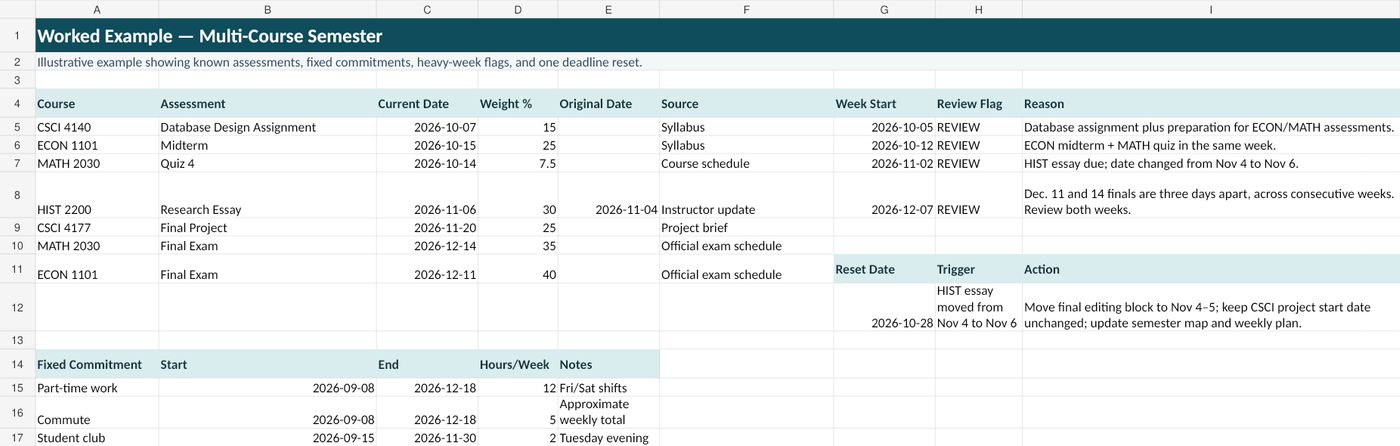
Suppose a student has these assessment dates:
| Course | Assessment | Date | Known weight |
|---|---|---|---|
| CSCI 4140 | Database Design Assignment | Oct. 7 | 15% |
| MATH 2030 | Quiz 4 | Oct. 14 | 7.5% |
| ECON 1101 | Midterm | Oct. 15 | 25% |
| HIST 2200 | Research Essay | Nov. 6 | 30% |
| CSCI 4177 | Final Project | Nov. 20 | 25% |
| ECON 1101 | Final Exam | Dec. 11 | 40% |
| MATH 2030 | Final Exam | Dec. 14 | 35% |
The week beginning October 12 clearly deserves a review: ECON and MATH assessments land together.
In the 2026 example, the week beginning December 7 contains the December 11 final; the December 14 final falls in the following week. They are only three days apart, so inspect the boundary between those weeks rather than treating either week in isolation.
The marker itself does not decide what to do. It tells the student where to investigate.
Step 4: Backward-plan major work
For large work, the due date is the end of the plan, not the start.
Waterloo and UTSC both provide practical guidance for breaking work into earlier stages and planning backward from the final deadline.[3][4]
For a research essay, your earlier steps might be:
- Choose/refine the question.
- Find sources.
- Read and take notes.
- Build an outline.
- Draft.
- Revise.
- Final proof and submission check.
You do not need to turn the semester map into a minute-by-minute schedule.
The term-level job is to make sure the work has somewhere to begin before the deadline week.
Step 5: Add reset checkpoints
Semester plans become stale.
A course may change:
- assignment date;
- exam information;
- project scope;
- grade weighting;
- class meeting;
- instructor requirement.
A work schedule or personal commitment may also change.
The Qumely reset rule is simple:
When a meaningful input changes, update the term map and record what the change affects.
Useful reset moments include:
- after add/drop;
- after a major syllabus update;
- when an assessment moves;
- after a major illness or absence;
- when several planned tasks were missed;
- when the weekly plan repeatedly stops matching reality.
Example: one deadline moves
The HIST research essay was originally due November 4.
The instructor moves it to November 6.
Do not simply replace the date and forget the old plan.
Record:
- old date: Nov. 4;
- new date: Nov. 6;
- affected week;
- which editing blocks can move;
- whether another course now has space;
- whether the heavy-week flag changed.
The Semester Planner includes a Reset Log for exactly this purpose.
Step 6: Hand the semester map into weekly planning
The semester plan should not compete with your weekly system.
They do different jobs.
Semester map
Answers:
- Where are the major commitments?
- Which weeks deserve attention?
- When should large work begin?
- What changed?
Weekly system
Answers:
- What am I actually doing this week?
- Which assignments are due soon?
- What needs to start now?
- What changed since the last review?
For assignment-level maintenance, use the one reliable assignment-system method and the College Assignment Tracker Template.
A practical semester-reset checklist
Build the term map
- ☐ Add all active courses.
- ☐ Add recurring class commitments.
- ☐ Add major assessments from course sources.
- ☐ Add official academic-calendar dates.
- ☐ Add fixed work/personal commitments.
- ☐ Add known weights where useful.
- ☐ Mark unclear/TBD information instead of guessing.
Review heavy periods
- ☐ Check weeks with multiple major assessments.
- ☐ Check weeks with a high concentration of known weight.
- ☐ Check weeks with unusually high fixed commitments.
- ☐ Decide which large tasks need earlier start points.
Reset when needed
- ☐ Record changed dates.
- ☐ Update affected weeks.
- ☐ Move only work that still fits the remaining time.
- ☐ Keep the old source/change history when useful.
- ☐ Hand the next one or two weeks into the weekly plan.
What this framework does not do
The semester map cannot know:
- exactly how difficult every task will feel;
- how long every assignment will take;
- which unexpected course changes will happen;
- the scientifically optimal distribution of your time.
Its job is more practical:
Make the known semester visible early enough to act on it.
Build the map. Mark the weeks that need attention. Reset it when the inputs change. Then use a weekly system to execute.
Sources
1. Cornell University Learning Strategies Center, Semester and Weekly Calendars.
2. Cornell University Learning Strategies Center, Managing Time.
3. University of Waterloo, Simple steps to backwards plan for the term.
4. University of Toronto Scarborough Learning Strategies, Assignment Planner.