Free College Semester Calendar Template With a Worked Example
Map courses, assessments, fixed commitments, and likely heavy weeks in one reusable semester-planning workbook.

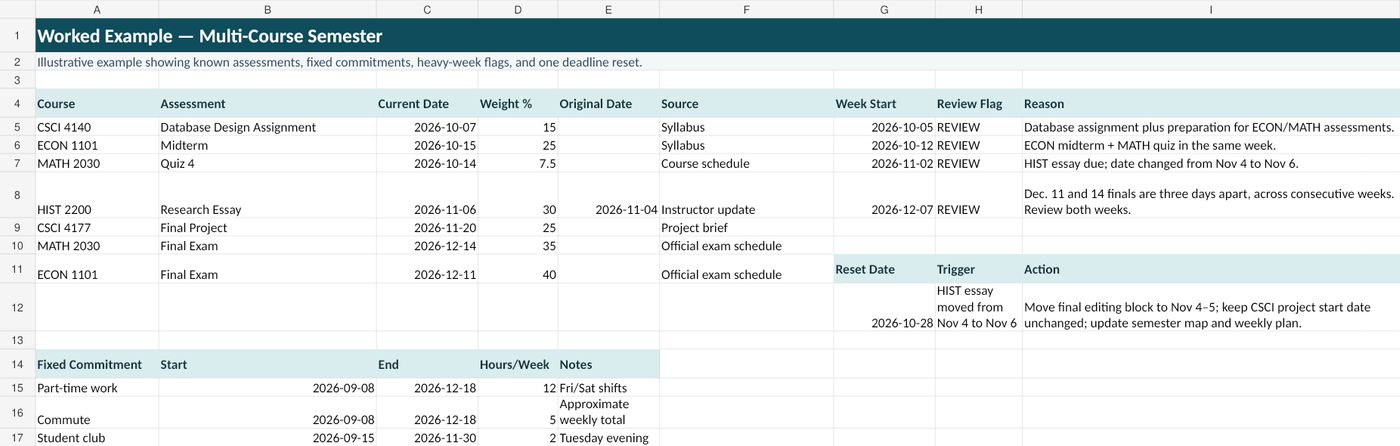
This free workbook gives you one place to map a college semester before the weekly rush starts. It includes a semester map, fixed commitments, major assessments, a transparent heavy-week review, a reset log, and a completed example.
The workbook does not promise to predict your semester perfectly. Its job is simpler and more useful: make the workload you already know about visible early enough to act.
Set up the inputs, then review the semester map
Start in Instructions and set the term dates and review thresholds. Then check the actual week-start and week-end dates in Semester Map, columns A–B. They are editable dates; changing the term dates in Instructions does not rebuild that list automatically.
Enter assessments in Major Assessments and recurring time commitments in Fixed Commitments. The Semester Map summarizes those inputs in columns C–F; do not overwrite those formulas with individual events.
Record breaks, travel, and other unusual dates in the map's Main Items / Notes column, and use Reset Needed? to flag a week that needs another look. Do not invent dates for unresolved assessments.
Use Official Source / Link in Major Assessments for the syllabus, LMS item, instructor announcement, or official calendar behind a date. Use the relevant Notes fields for context that is not an assessment.
For a full method—not just the spreadsheet—use the college semester planning workflow.
Add fixed commitments before estimating free time
A calendar looks deceptively open when it contains deadlines but not the hours already spoken for.
Use Fixed Commitments for:
- classes and labs
- work
- commuting
- recurring appointments
- athletics or clubs
- caregiving
- sleep and essential routines
The goal is not to schedule every minute. It is to stop treating unavailable time as study capacity. The map is not a complete free-time calculator: protect sleep and essential routines when making your weekly plan as well. If you also enter those baseline hours under Fixed Commitments, adjust the default 18-hour review threshold; otherwise nearly every week may be flagged.
Record major assessments separately
The Major Assessments sheet is the place for high-impact work that needs preparation before the due date.
For each item, record:
| Field | What it tells you |
|---|---|
| Course | Which class owns the work |
| Assessment | The assignment, exam, presentation, or project |
| Due or exam date | The current confirmed date |
| Weight | Optional grade impact, if the course provides it |
| Source | Where the information came from |
| Start or checkpoint | When meaningful preparation should begin |
| Notes | Dependencies, partners, required materials, or uncertainty |
Weight is optional. A 5% quiz can still require attention, and a 30% project can still be impossible to start until a topic is approved. Use weight as context, not as an automatic priority score.
Use the heavy-week review transparently
The Heavy Week Review does not contain a scientifically optimal workload formula. It is a Qumely planning aid that helps you inspect weeks with several known obligations.
The automatic REVIEW flag uses the editable thresholds in Instructions: at least 2 major assessments, 20 percentage points of known course weight due, or 18 fixed-commitment hours. These are prompts, not calibrated workload limits. Percentages from different courses do not add up to an overall semester grade.
Also inspect the week manually for:
- several due dates
- a major assessment
- unusually long work shifts
- overlapping exams
- limited available time
- a project checkpoint that unlocks later work
The marker is a prompt to investigate, not a prediction that the week will be bad.
When a week is marked heavy, choose a response:
- start one large item earlier;
- move flexible preparation into a lighter week;
- reduce optional commitments;
- ask a group or instructor question before it becomes urgent;
- protect a specific block of time.
Use the reset log when reality changes
A semester plan becomes unreliable when changed information is silently overwritten.
Use Reset Log to record:
- what changed;
- the old date or assumption;
- the new information;
- the source;
- which weeks or tasks are affected;
- what you changed in response.
Example: an ECON paper moves from October 12 to October 19. The new date appears easier, but October 19 may already contain a midterm and lab report. The reset is not complete until you review the surrounding week and move preparation accordingly.
Work through the example before deleting it
The Worked Example shows a multi-course term with:
- different assessment types;
- known and unknown weights;
- fixed work commitments;
- a changed deadline;
- heavy weeks;
- a documented reset action.
Use it to understand the workbook, then copy the structure into the blank planning sheets.
Turn the semester map into weekly action
The semester workbook is a long-range map. It is not your daily task list.
Once a week, look ahead and choose the work that must enter your actionable system. The reliable assignment-system guide explains how to capture, verify, and maintain those tasks. The college assignment tracker template provides a master and weekly view.
A useful handoff looks like this:
| Semester map says | Weekly system does |
|---|---|
| Research paper due in three weeks | Schedule topic approval and source collection |
| Two midterms next month | Begin repeated study encounters |
| Heavy week approaching | Advance one flexible task |
| Deadline changed | Update the source-linked task and review conflicts |
| Date still TBD | Keep it visible as unresolved |
Semester-planner checklist
Before considering your map usable, confirm that:
- every course appears;
- major assessments have a source;
- institutional breaks and exam periods are visible;
- fixed commitments are included;
- TBD items are marked rather than guessed;
- at least the next few heavy periods have been reviewed;
- one reset point is planned after early course changes;
- the term map has a clear handoff to weekly action.
The workbook is complete when it helps you see what is coming, what may collide, and what needs to move—not when every cell is filled.